Globe 4G and 5G Coverage Map for the Philippines
Struggling with slow internet or unsure if your area really has strong 4G or 5G coverage? You are not alone. Globe’s 4G & 5G coverage map is often the first place people check when they want to know if their area has strong network support. With massive expansion in both 4G & 5G networks, Globe promises fast, reliable connectivity across the Philippines. But the real question is, how good is the signal exactly where you live?
In this guide, you will discover the most accurate ways to check Globe signal strength in your area using tools like the GlobeOne app, real-time speed tests, and coverage maps based on actual user data. You will also learn simple tricks to boost your signal and get faster, more stable internet without spending extra.
Globe’s 4G & 5G Coverage in 2026
Globe’s network combines wide 4G availability with fast 5G speeds. For daily tasks such as browsing, video calls, and streaming, 4G provides consistent performance, while 5G offers faster speeds and lower latency in supported areas.
As of 2026, Globe continues to expand its network, reaching most of the population across the Philippines. Instead of relying only on official data, it is important to use practical methods to check what is truly available in your area.
Official Globe 4G & 5G Coverage Area Stats
Globe’s network now reaches around 96.33 percent of the Philippine population with strong 4G and 5G coverage.
Thousands of network sites are already active, and new ones are added regularly. You can visit the official Globe website or use the GlobeOne app to check the latest availability in your location.
How to Know If You’re on 4G or 5G
To check if you are on 4G or 5g use following methods:
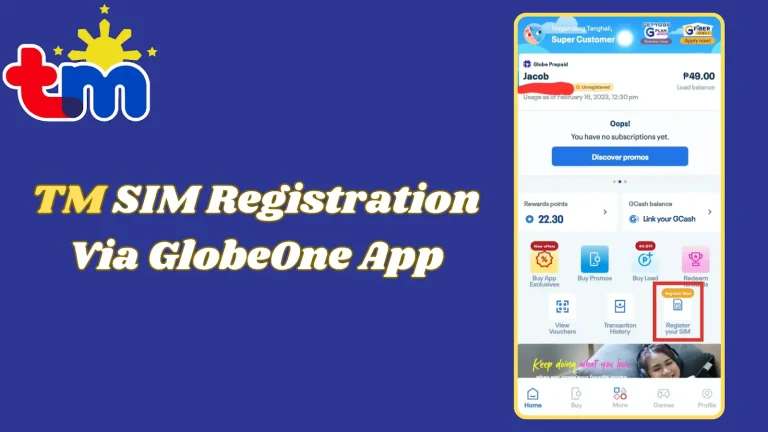
GlobeOne App (Fastest Way to Check in 2026)
The GlobeOne app is the easiest way to check your connection status.
This makes it the fastest and most accurate tool for checking your real-time network performance.
Interactive Coverage Maps
You can also use third-party tools such as nPerf, Opensignal, or CellMapper to get a clearer picture of network performance.
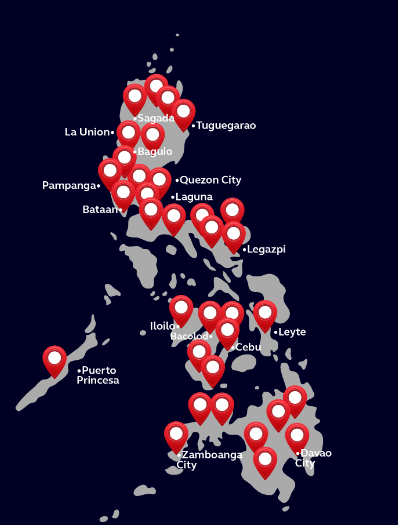
Globe At Home 5G Wifi Coverage Areas (For Your House)
If you are planning to install home internet, Globe provides a dedicated checker for availability.
This helps you decide before applying for installation.
City / Area | 4G Coverage | 5G Coverage Level | Notes |
|---|---|---|---|
Metro Manila | Excellent (near 100%) | Nearly 99% | Best in the country |
Cebu City | Excellent | Very High | Strong urban signal |
Davao City | Excellent | Very High | Reliable everywhere |
Bacolod City | Excellent | High | Good expansion |
Iloilo City | Excellent | High | Solid in city & nearby |
Cagayan de Oro | Excellent | High | Growing fast |
General Santos | Excellent | High | Very reliable |
Batangas City | Excellent | High | Strong coverage |
Cavite / Laguna | Excellent | High | Close to Metro Manila |
Mandaue City | Excellent | High | Part of Cebu area |
Quick Coverage Check Tools
Tool | How to Use | Best For |
|---|---|---|
GlobeOne App | Log in → see 4G/5G badge & speed test | Instant personal check |
Official Globe Page | globe.com.ph/5g | Overview & stats |
nPerf Map | nperf.com → select Globe | Interactive signal map |
Opensignal App | Download app → Globe coverage | Real-user data |
Globe At Home Checker | shop.globe.com.ph/gah5gwifi/check-my-area | Home broadband |
How to Check Globe Signal Strength in Your Area
Tips to Maximize Your Globe 4G and 5G Experience
Key Features of Globe’s Network Coverage in Philippines
Here are some key features of Globe network coverage in the Philippines:
Extensive Reach
Globe boasts a broad network, covering even remote areas of the Philippines, ensuring you stay connected almost anywhere in the country.
Telecommunication Services
They offer a wide range of telecommunication services, from traditional voice calls to high-speed internet, addressing your various communication needs.
Strong Signal Strength
Globe emphasizes strong signal strength across its coverage area, minimizing dropped calls and ensuring a smooth connection.
Reliable Network
Their network is known for its reliability, providing consistent connectivity even during peak usage times or bad weather.

Conclusion
Globe’s 4G & 5G coverage map is a great starting point to see where fast internet is available, but it does not tell the full story. Real-life signal strength and speed can vary depending on your exact location, indoor obstacles, and network traffic.
For the most accurate results, use the GlobeOne app to check real-time 4G or 5G connectivity, run speed tests, and, if you’re installing home broadband, verify availability with Globe At Home’s checker. By combining these tools, you can ensure a reliable, high-speed connection wherever you are, whether for streaming, gaming, working from home, or staying connected with family and friends.
With Globe’s expanding network and the right checks in place, getting fast and stable internet in 2026 has never been easier.