Globe At home Prepaid Wifi
Tired of slow WiFi that can’t even handle Netflix + homework at the same time? Say goodbye to buffering frustration and surprise bills! Globe At Home Prepaid WiFi gives you fast, reliable home internet with zero installation and zero monthly fees. Just plug it in, claim your 20GB FREE bonus, and let the whole family browse, stream, game, and study without fighting over the connection.
Whether you’re renting, living in a condo, or simply want total control over your internet budget, this prepaid WiFi modem is the easiest and smartest way to get everyone online in minutes no technician, no contract, no stress. Thousands of Filipino families are already loving the freedom and savings!
What is Globe At Home Prepaid WiFi?
Globe At Home Prepaid WiFi offers a prepaid internet connection for your home. It’s essentially a mobile WiFi device that plugs into a power outlet, providing WiFi access for multiple devices. This eliminates the need for installation and allows you to enjoy the internet without a monthly commitment.
Current FamSURF Data Promos for Globe At Home Prepaid WiFi
These shareable promos are perfect for the whole family and register easily through the GlobeOne app. You can also use the “Group Data” feature to share with family members! Whether you need a quick top-up for the weekend or a bigger package for the whole month, there’s something for every lifestyle. The data is open-access and shareable, so everyone in the house can use it for YouTube, Netflix, online shopping, or schoolwork without restrictions.
Promo | Data (Shareable Open Access) | Price | Validity |
|---|---|---|---|
FamSURF50 | 5 GB | ₱50 | 3 days |
FamSURF Extra 199 | 50 GB | ₱199 | 7 days |
FamSURF Extra 299 | 75 GB | ₱299 | 7 days |
FamSURF Extra 499 | 120 GB | ₱499 | 15 days |
FamSURF Extra 999 | 250 GB | ₱999 | 30 days |
Many users love keeping these with the initial 20 GB bonus for even more value. Just register via the app or *143# and you’re set.
How to Get Globe at Home Prepaid WiFi
Getting started with Globe At Home Prepaid WiFi is easy! Here’s what you need to do in simple, step-by-step detail:
- Purchase a Globe At Home Prepaid WiFi modem from authorized retailers (Globe stores, Lazada, Shopee, or official online shops). Starter kits are around ₱1,799 with the free 20 GB bonus.
- The modem comes with a free SIM card and starting data balance.
- Download the GlobeOne app from the App Store or Google Play, register your Globe At Home Prepaid WiFi SIM using your ID, and claim your 20 GB bonus instantly.
- Choose a data promo that fits your needs and register your Globe sim through the GlobeOne app, SMS, GCash, or online portal.
- Plug in the power adapter, wait for the signal lights to stabilize (blue means good connection), and connect your devices using the WiFi name and password printed on the modem sticker.
Enjoy browsing, streaming, and staying connected! The whole process usually takes less than 15 minutes.
Benefits of Globe at home Prepaid Wifi
Here are a few benefits of Globe At Home Prepaid WiFi that make it a favorite choice for many households:
Budget-Friendly
No monthly fees just prepaid load for your data usage. You only pay for what you actually use, so there’s no wasted money on unused data at the end of the month. This is especially helpful for families on a tight budget who want to control their expenses.
Fast and Reliable
Enjoy a strong and stable connection with wider coverage than typical pocket WiFi devices, perfect for browsing, streaming, and even gaming. Many users report smoother video calls and less lag during peak hours compared to smaller portable devices.
Wide Coverage
Get a strong signal and better WiFi reach throughout your home. The modem is built to cover a standard Philippine household, reaching bedrooms, kitchen, and living room without dead zones in most cases.
Easy to Set Up
Globe At Home Prepaid WiFi is known for its hassle-free setup. Just plug it in, load up, and you’re ready to connect! No need to wait for installation or deal with complicated wiring. In minutes, your whole family can be online.
Freebies
New Globe At Home Prepaid WiFi modems now come with a one-time 20 GB bonus valid for 90 days (claim it right after registering in the GlobeOne app). This generous starter data lets you test the service and enjoy free internet while you decide on your first promo.
Shareable Connection
Connect multiple devices (up to 5 at once) to your Globe At Home Prepaid WiFi, allowing your whole family to enjoy the internet. This makes it ideal for households where everyone relies on the internet kids for online classes, parents for work, and everyone for entertainment.
Variety of Data Promos
Globe offers a range of prepaid data promos designed for different needs and budgets. Choose from shareable FamSURF packages for browsing, streaming videos, or specific apps.
Optional LAN Port
Some models include a LAN port for wired connections to computers or gaming systems, giving you even more flexibility for high-speed tasks like online gaming or file downloads.
Pros and cons of Globe at Home Prepaid Wifi
Pros | Cons |
Easy setup and instant internet. | Data can run out requiring monitoring. |
Shareable data for multiple devices. | Prepaid has potentially higher cost per GB compared to postpaid. |
Prepaid flexibility, only pay for what you use. | Limited data options, may not have unlimited plans. |
Promo options for different needs and budgets. | Speed variations depending on location and cell signal strength. |
Globe At Home Prepaid WiFi vs Other Options
Not sure if this is the right choice for you? Here’s a quick comparison to help you decide:
Choose based on your location, budget, and speed needs.
Customer Reviews
Customers highly value Globe at Home Prepaid Wifi due to its reliability and affordability! Fast, easy setup, and budget-friendly data promos. Perfect for anyone who wants the internet at home without any problem.
Tips for Better Performance of Globe at Home Wifi
To get the most out of your device, follow these practical tips:
These small steps can make a big difference in speed and stability.
Troubleshooting Common Issues
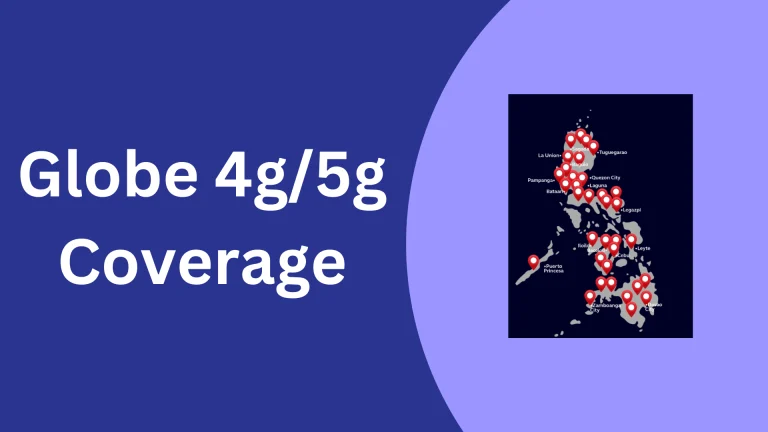
If you face slow speeds, try moving the modem closer to a window or restarting it. Weak signal? Check Globe’s coverage map on their website. Data not working? Make sure your promo is registered correctly in the app. Most issues are fixed in minutes with these simple checks.

Conclusion
Globe At Home Prepaid WiFi is a convenient and affordable option for those seeking a flexible internet connection at home. With its easy setup, fast speeds, various data promos, and 20 GB free bonus, it’s a great alternative to traditional postpaid plans.
Thousands of families across the Philippines are already enjoying the freedom it brings – no contracts, no installation hassles, and full control over their internet use. However, be sure to consider your data consumption patterns and coverage in your area before making a decision.