DITO Compatible Phones | List Of 4G and 5G Compatible Devices

As DITO Telecommunity continues to expand across the Philippines, more users are curious whether their phones will be compatible with the network. A DITO compatible phone is a device that is capable of supporting the specific bands and technology of DITO users for calls, texts, and mobile data. If your phone isn’t compatible, you can face issues with connectivity or not be able to use the network at all.

Keep reading to learn what makes a phone compatible with DITO, how to check if your device works with the network, and why compatibility is important. Below, you’ll also find a list of supported devices for a smooth connection.

What Are DITO Compatible Phones?

DITO compatible phones are devices that support the specific network bands and technology used by DITO Telecommunity. For a phone to work properly with DITO, it must meet the following criteria:

  • 4G LTE or 5G Capability: DITO works on advanced 4G and 5G networks. Phones must support these technologies for high-speed data and calls.
  • VoLTE Support: Voice over LTE (VoLTE) is essential for making clear voice calls on the DITO network.
  • Frequency Bands: Phones must be compatible with DITO’s operating bands, specifically Band 28 (700 MHz), Band 41 (2500 MHz), and Band 1 (2100 MHz)

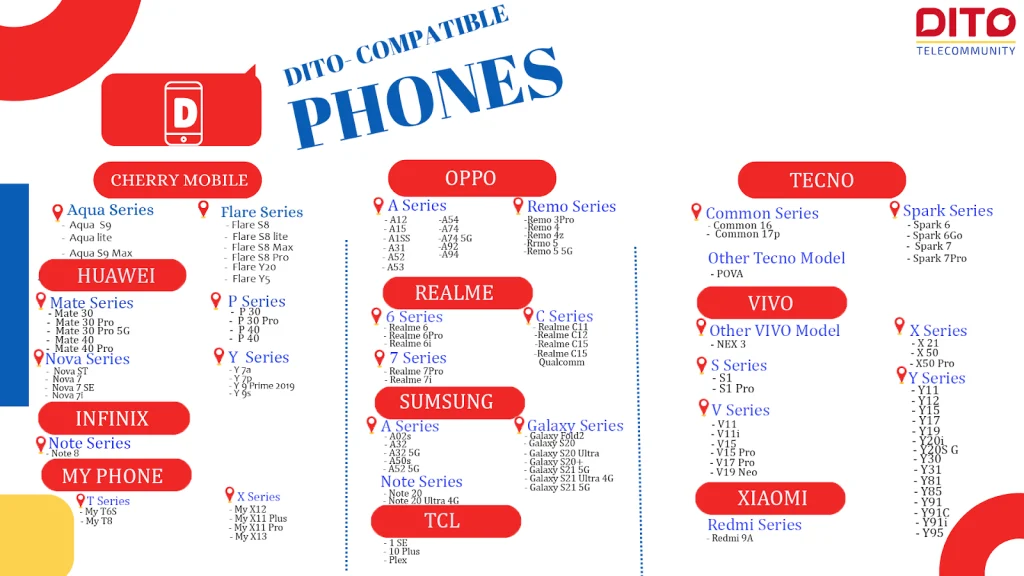
List of DITO Compatible Phones

List of DITO Compatible Phones

4G/LTE Compatible Phones

Cherry Mobile

Aqua Series

  • Aqua S9
  • Aqua S10 Pro

Flare Series

  • Flare S8
  • Flare S8 Lite
  • Flare S8 Max
  • Flare S8 Pro
  • Flare Y20
  • Flare Y5

Google

Pixel

  • Pixel 6
  • Pixel 6 Pro
  • Pixel 6a
  • Pixel 7
  • Pixel Pro
  • Pixel 7a
  • Pixel 8
  • Pixel 8 Pro

Honor 

90 Series

  • Honor 90
  • Honor 90 Lite

X Series

  • Honor X9a 5G
  • Honor X6a

Huawei 

Mate Series

  • Mate 30
  • Mate 30 Pro
  • Mate 30 Pro 5G
  • Mate 40
  • Mate 40 Pro
  • Mate Xs 2
  • Mate X3

Nova Series

  • Nova 5T
  • Nova 7
  • Nova 7 SE
  • Nova 7i
  • Nova 8
  • Nova 9
  • Nova 10
  • Nova 10 Pro
  • Nova 11
  • Nova 11 Pro
  • Nova Y70

P Series

  • P30
  • P30 Pro
  • P40
  • P40 Pro
  • P50
  • P50 Pocket
  • P50 Pro

Y Series

  • Y6p
  • Y7a 
  • Y7p 
  • Y9 Prime 2019
  • Y9s

Infinix 

Hot Series

  • Hot 9 Play
  • Hot 10
  • Hot 10 Play
  • Hot 11S
  • Hot 11S NFC

Note Series

  • Note 7
  • Note 8
  • Note 10
  • Note 11S
  • Note 30 5G

Smart Series

  • Smart 5
  • Smart 6

Zero Series

  • Zero X
  • Zero X Neo
  • Zero X Pro

itel  

P Series

  • P55 5G

Vision Series

  • Vision 2
  • Vision 2 Plus

MyPhone

T Series

  • MyT6S
  • MyT8 

W Series

  • MyWX1 Plus
  • MyWX2
  • MyWX2 Pro

X Series

  • MyX12
  • MyXI1 Plus
  • MyXI1 Pro
  • MyXI3

narzo 

narzo series

  • narzo 50
  • narzo 50A
  • narzo 50 5G
  • narzo 50A Prime
  • narzo 50i Prime
  • narzo 50 Pro 5G

Nokia 

G Series

  • G10 
  • G50

Nubia 

Red Magic Series

  • Red Magic 8 Pro 

Oppo

A Series

  • A12
  • A15
  • A15s
  • A16
  • A17
  • A17K
  • A31
  • A52
  • A53
  • A54
  • A55
  • A57
  • A74
  • A74 5G
  • A76
  • A78 5G
  • A92
  • A94
  • A95

Reno Series

  • Reno 3 Pro
  • Reno 4
  • Reno 4z
  • Reno 5
  • Reno 5 5G
  • Reno 6 5G
  • Reno 6z 5G
  • Reno 7 5G
  • Reno 7z
  • Reno 8 5G
  • Reno 8Z 5G

Poco 

C Series

  • C40 

F Series

  • F3 
  • F4
  • F4 GT
  • F5 
  • F5 Pro

M Series

  • M4 Pro 5G
  • M5
  • M5S

X Series

  • X3
  • X4 GT
  • X5 Pro 5G

Realme 

6 Series

  • realme 6
  • realme 6 Pro
  • realme 6i

7 Series

  • realme 7 Pro
  • realme 7i

8 Series

  • realme 8
  • realme 8 Pro
  • realme 8 5G
  • realme 8i

9 Series

  • realme 9
  • realme 9i
  • realme 9 Pro
  • realme 9 Pro+

10 Series

  • realme 10 Pro+ 5G
  • realme 10 Pro 5G

11 Series

  • realme 11
  • realme 11 Pro
  • realme 11 Pro+ 5G

C Series

  • realme C11
  • realme C11 2021
  • realme C12
  • realme C15
  • realme C15 Qualcomm
  • realme C21Y
  • realme C25
  • realme C25s
  • realme C25Y
  • realme C30
  • realme C30S
  • realme C33
  • realme C35
  • realme C51
  • realme C53
  • realme C55

GT Series

  • realme GT Master Edition

Pad

  • realme Pad
  • realme Pad 2
  • realme Pad Mini
  • realme Pad X

Samsung 

Galaxy A Series

  • A01
  • A02
  • A02s
  • A03s
  • A04e
  • A04
  • A05
  • A05s
  • A10
  • A10s
  • A11
  • A12
  • A14 5G
  • A15 5G
  • A20
  • A20s
  • A21s
  • A22
  • A22 5G
  • A23 5G
  • A25 5G
  • A30
  • A30s
  • A31
  • A32
  • A32 5G
  • A42 5G
  • A50s
  • A52
  • A52s 5G
  • A52 5G
  • A54 5G
  • A72

Galaxy M Series

  • M11
  • M22
  • M32

Galaxy Note Series

  • Note 10+
  • Note 20
  • Note 20 Ultra 5G

Galaxy S Series

  • S20
  • S20+
  • S20 FE
  • S20 FE 5G
  • S20 Ultra
  • S21 5G
  • S21+ 5G
  • S21 Ultra 5G
  • S23

Galaxy Z Series

  • Z Flip 3 5G
  • Z Fold 2
  • Z Fold 3 5G
  • Z Flip 4

TCL

  • 1 SE
  • 10 Plus
  • 10 5G
  • 20 SE
  • Plex

Tecno 

Camon Series

  • CAMON 16
  • CAMON 17P
  • CAMON 18
  • CAMON 18 PREMIER
  • Camon 20 Pro 5G

Other Tecno Models

  • POP 5 LTE
  • POVA
  • POVA 4

Spark Series

  • SPARK 6
  • SPARK 6 Go
  • SPARK 7
  • SPARK 7 Pro

Vivo 

Other Vivo Models

  • NEX3

S Series

  • S1
  • S1 Pro

V Series

  • V11
  • V11i
  • V15
  • V15 Pro
  • V17 Pro
  • V19 Neo
  • V20
  • V21 5G
  • V21e
  • V20pro 5G
  • V20SE
  • V27 5G

X Series

  • X21
  • X50
  • X50 Pro
  • X60 5G
  • X70 5G

Y Series

  • Y02t
  • Y1s
  • Y11
  • Y12
  • Y12A
  • Y12S
  • Y15
  • Y15A
  • Y15S
  • Y17
  • Y19
  • Y20i
  • Y20S G
  • Y30
  • Y31
  • Y33s
  • Y36 5G
  • Y81
  • Y85
  • Y91
  • Y91C
  • Y91i
  • Y95

Xiaomi 

10 Series

  • Redmi 10

Redmi Note Series

  • Redmi Note 10 5G
  • Redmi Note 11
  • Redmi Note 11 Pro 5G

Redmi Series

  • Redmi 9A
  • Redmi 9C​
  • Redmi 9T
  • Redmi 10 5G
  • Redmi 10C
  • Redmi 12C

Xiaomi 11 Series

  • Xiaomi 11 Lite 5G NE
  • Xiaomi 11T
  • Xiaomi 11T Pro

Xiaomi 12 Series

  • Xiaomi 12
  • Xiaomi 12 Lite

ZTE

Blade Series

  • Blade A53
  • Blade V1 Vita 5G

A Series

  • A33s
  • A73 5G

5G Compatible Phones

Huawei 

Mate Series

  • Mate 30 Pro 5G
  • Mate 40 Pro 5G

P Series

  • P40 
  • P40 Pro

Infinix

Note Series

  • Note 30 Pro 5G

narzo 

narzo series

  • narzo 50 5G
  • narzo 50 Pro 5G

Nubia 

Red Magic Series

  • Red Magic 8 Pro

Oppo 

A Series

  • A78 5G

Reno Series

  • Reno 8 5G
  • Reno 8 Z 5G
  • Reno 7 5G
  • Reno 7 Z

POCO 

F Series

  • F4
  • F4 GT
  • F5
  • F5 Pro

M Series

  • M4 Pro 5G

X Series

  • X5 Pro 5G
  • X4 GT

Realme

9 Series

  • realme 9 Pro
  • realme 9 Pro+

10 Series

  • realme 10 Pro+ 5G
  • realme 10 Pro 5G

Pad 

  • realme Pad X

11 Series

  • 11 Pro 5G
  • 11 Pro+ 5G

Samsung

Galaxy A Series

  • A14 5G
  • A23 5G
  • A52s 5G
  • A54 5g

Galaxy S Series

  • S21 5G
  • S21+ 5G
  • S21 Ultra 5G
  • S23

Galaxy Z Series

  • Z Flip 4

Tecno 

Camon 

  • Camon 20 Pro 5G

Vivo 

Y Series

  • Y36 5G

V Series

  • V27 5G

Xiaomi

Xiaomi 11 Series

  • 11 Lite 5 NE
  • 11T
  • 11T Pro

Redmi Series

  • Redmi 10 5G
  • Redmi 12 5G

Xiaomi 12 Series

  • Xiaomi 12
  • Xiaomi 12 Lite

ZTE

A Series

  • A73 5G

Blade Series

  • V41 vita 5G

How to Check If Your Phone Is DITO-Compatible

It’s essential to verify if your phone works with DITO before purchasing a SIM card. Here are easy steps to check compatibility:

  • Visit the Official DITO Website: DITO provides an updated list of compatible devices on their website. You can also check from the list given above.
  • Check Phone Specifications: Look at your phone’s technical specifications to confirm if it supports 4G/5G, VoLTE, and the required frequency bands.
  • Test with a DITO SIM: If you already have a DITO SIM, insert it into your phone to see if it can detect the network and access data and calls.

Conclusion

A DITO-compatible phone is essential to enjoy smooth connectivity, fast internet, and clear calls. Understanding the compatibility requirements and checking your device can ensure the best experience on DITO’s growing network.

If your phone is not compatible, an upgrade to a supported device can unlock all the benefits of what DITO can provide. Be sure to check your phone’s compatibility before switching to DITO to avoid service disruptions.


FAQs || YOU MAY WANT TO KNOW

To activate a DITO SIM on a non-compatible phone:

  • Insert the DITO SIM.
  • Set APN to internet.dito.ph in network settings.
  • Enable VoLTE if available.
  • Use the DITO app on another device for registration.

DITO works with 4G LTE and 5G VoLTE phones. Supported brands include: Samsung, Oppo, Vivo, Xiaomi, and Realme (newer models).

No, the phone must support DITO’s frequency bands and have VoLTE capability to function correctly.

Older phones without 4G LTE or VoLTE support may not work on the DITO network.

You can purchase compatible phones from official brand stores, online marketplaces, or DITO kiosks.

Similar Posts